在《黑客帝国》中,有一个场景是莫菲斯将训练程序加载到 Neo 的大脑里,Neo 醒来后说:“我会功夫了。”
这基本上就是 Claude 技能的含义。
They’re a set of instructions that teach Claude how to do a certain thing. You explain it once in a document, like a training manual, and hand that to Claude. The next time you ask Claude to do that thing, it reaches for this document, reads the instructions, and does the thing.
它们是一组指令,用来教 Claude 如何完成某项任务。你只需在一个文档中解释一次,就像培训手册一样,然后交给 Claude。下次你让 Claude 做这件事时,它会查阅这个文档,阅读指令,然后完成任务。
你再也不需要重复解释。
In this article, I’ll go over everything Claude Skills related, how it works, where to use it, and even how to build one yourself.
在本文中,我将全面介绍 Claude Skills,包括它的工作原理、使用场景,甚至如何自己构建一个。
Got Skills?
技能本质上是一个自包含的“插件”(也称为 Agent Skill),以文件夹的形式打包,包含自定义指令、可选的代码脚本和资源文件,Claude 在执行专业任务时可以加载这些内容。
实际上,技能可以让 Claude 按需以专家级的熟练度处理特定的工作流程或领域。例如,Anthropic 内置的技能使 Claude 能够生成带有公式的 Excel 电子表格、创建格式化的 Word 文档、构建 PowerPoint 演示文稿或填写 PDF 表单,这些任务都超出了 Claude 的基础训练范围。
技能本质上充当了按需专家,当 Claude 识别到用户的请求与某项技能的领域匹配时,会在对话中“调用”该技能。关键的是,技能在一个沙盒化的代码执行环境中运行,以确保安全,这意味着它们在明确定义的范围内操作,并且只执行你允许的操作。
教我吧,师父
至少,一个技能是一个包含名为 SKILL.md 的主文件的文件夹(以及任何补充文件或脚本)。这个主文件包含技能的名称和描述。
接下来是包含该技能详细说明、示例或工作流程指导的 Markdown 正文。技能文件夹还可以包含其他 Markdown 文件(参考资料、模板、示例等)以及技能所用的代码脚本(如 Python 或 JavaScript)。
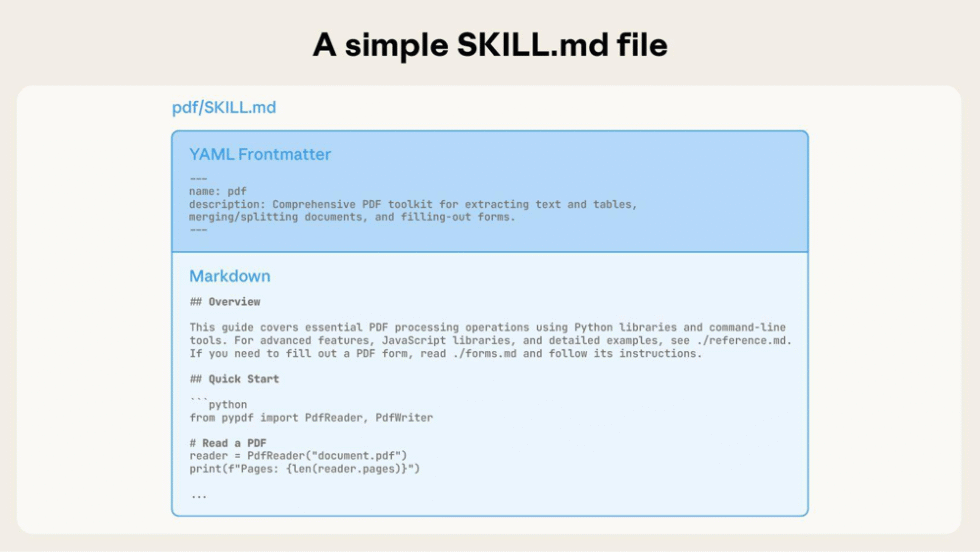
The technical magic happens through something called “progressive disclosure” (which sounds like a therapy technique but is actually good context engineering).
技术上的神奇之处在于一种叫做“渐进式披露”的方法(听起来像是一种治疗技术,但实际上是一种很好的上下文工程手段)。
在启动时,Claude 会扫描每个技能的元数据以获取名称和描述。因此,在上下文中它知道有一个可以提取文本的 PDF 技能。
当你与 Claude 聊天并要求它分析一个 PDF 文档时,它会意识到需要 PDF 技能,并读取主文件的其余部分。如果你上传了任何补充材料,Claude 会决定哪些是需要的,并只将这些内容加载到上下文中。
通过这种方式,一个技能可以封装大量的知识或代码,而不会让上下文窗口不堪重负。如果有多个技能看起来相关,Claude 可以在一个会话中同时加载并组合多个技能。
Code Execution 代码执行
技能的一个强大之处在于它们可以将可执行代码作为工具包的一部分。在技能文件夹中,你可以提供脚本(Python、Node.js、Bash 等),Claude 可以运行这些脚本来执行确定性操作或进行大量计算。
例如,Anthropic 的 PDF 技能配有一个 Python 脚本,可以解析 PDF 并提取表单字段数据。当 Claude 使用该技能填写 PDF 时,它会选择通过沙盒代码工具执行 Python 辅助脚本,而不是仅在 token 内尝试解析 PDF。
为了保证安全,技能在受限的执行沙盒中运行,且各会话之间没有持久性。
等等,为什么?

If you’ve used Claude and Claude Code a lot, you may be thinking that you’ve already come across similar features. So let’s clear up the confusion, because Claude’s ecosystem is starting to look like the MCU. Lots of cool characters but not clear how they all fit together.
如果你经常使用 Claude 和 Claude Code,你可能会觉得已经见过类似的功能。那么让我们来澄清一下,因为 Claude 的生态系统开始看起来像 MCU(漫威电影宇宙)。有很多很酷的角色,但不太清楚它们之间是如何协作的。
Skills vs Projects
在 Claude 中,项目是有界的工作空间,背景信息会在其中积累。当你创建一个项目时,可以设置项目级别的指令,比如“始终遵循以下品牌指南”。你还可以向项目中上传文档。
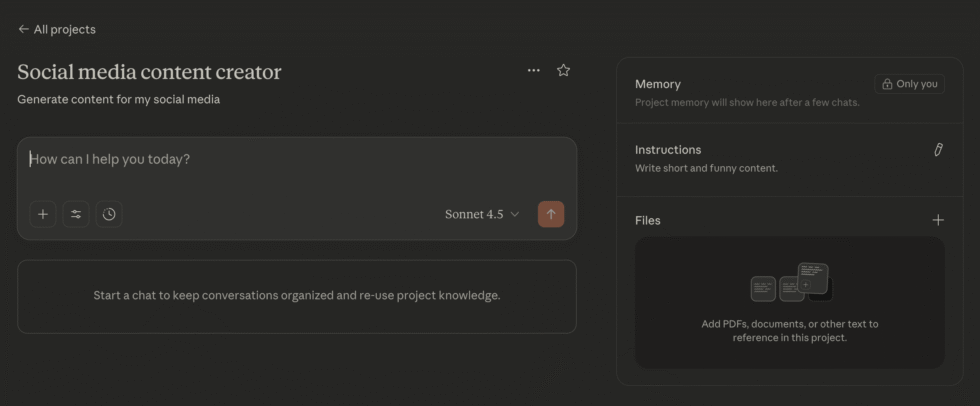
现在,每次你在该项目中开启新聊天时,所有这些指令和文档都会被加载作为上下文。随着时间推移,Claude 甚至会记住该项目中的过往对话。
所以,是的,这听起来确实像技能,因为在一个项目的范围内,你不需要重复指令。
但主要的区别在于,技能可以在任何地方使用。只需创建一次,就能在任何对话、任何项目或任何聊天中使用。通过渐进式披露,只有在需要时才会使用上下文。你还可以将多个技能串联起来。
简而言之,项目用于广泛的行为定制和持久化上下文,而技能则用于封装可重复的工作流程和专业知识。项目指令不会涉及编码或文件管理,而技能的构建则需要一些工程技术,并且在自动化工作方面要强大得多。
Skills vs MCP
If you’re not already familiar with Model Context Protocol, it’s just a way for Claude to connect with external data and APIs in a secure manner.
如果你还不熟悉 Model Context Protocol,它其实就是一种让 Claude 以安全的方式连接外部数据和 API 的方法。
如果你希望 Claude 能够写入你的 WordPress 博客,你可以设置一个 WordPress MCP,这样 Claude 就能将内容推送到博客上了。
这听起来可能像是一个技能,但区别在于,技能是指导 Claude 如何完成任务的指令,而 MCP 则让 Claude 能够实际执行这些操作。它们是互补的。
你甚至可以将它们与项目一起使用!
假设你有一个用于撰写博客内容的项目,并且你有关于如何写作的指导方针。你开启一个新的聊天,输入你想要写的主题,Claude 会按照你的指示进行写作。
当文章准备好后,你可以使用技能来提取 SEO 元数据,并将内容转化为推文。最后,使用 MCP 将这些内容推送到你的博客和其他平台。
Skills vs Slash Commands (Claude Code Only)
如果你是 Claude Code 用户,可能已经遇到过自定义斜杠命令,它允许你定义某个流程,并在需要时随时调用。
这实际上是现有最接近技能的 Claude 功能。主要区别在于,用户需要在需要时手动触发自定义斜杠命令,而技能则可以由 Claude 在判断需要时自动调用。
技能还允许实现更复杂的功能,而自定义斜杠命令则适用于你经常重复的简单任务(比如进行代码审查)。
Skills vs Subagents (Also Claude Code Only)
Claude Code 中的子代理指的是可以被创建出来,协助主 Claude 代理完成特定子任务的专业 AI 代理实例。它们拥有自己的上下文窗口,并且独立运行。
子代理本质上是另一个 AI 角色或模型实例,可以并行运行或按需启动,而技能并不是一个独立的 AI。它更像是主 Claude 的一个附加组件。
So while a Skill can greatly expand what the single Claude instance can do, it doesn’t provide the parallel processing or context isolation benefits that sub-agents do.
因此,虽然技能可以极大地扩展单个 Claude 实例的能力,但它并不具备子代理所带来的并行处理或上下文隔离的优势。
You already have skills
It turns out you’ve been using Skills without realizing it. Anthropic built four core document skills:
事实证明,你一直在不知不觉中使用 Skills。Anthropic 开发了四项核心文档技能:
- DOCX: Word documents with tracked changes, comments, formatting preservation
DOCX:带有修订、评论、格式保留的 Word 文档 - PPTX: PowerPoint presentations with layouts, templates, charts
PPTX:带有布局、模板、图表的 PowerPoint 演示文稿 - XLSX: Excel spreadsheets with formulas, data analysis, visualization
XLSX:带有公式、数据分析、可视化的 Excel 电子表格 - PDF: PDF creation, text extraction, form filling, document merging
PDF:PDF 创建、文本提取、表单填写、文档合并
这些技能包含高度优化的指令、参考库以及在 Claude 上下文窗口之外运行的代码。这也是为什么 Claude 现在可以生成 50 页幻灯片演示文稿,而不必像跑马拉松一样为上下文令牌喘息。
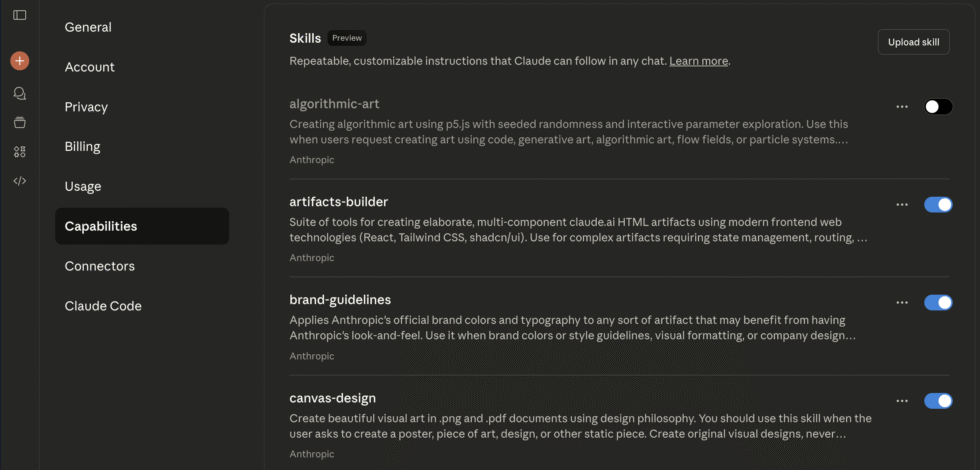
这些技能对所有人都是自动开放的。你无需手动启用。只需让 Claude 创建文档,相关技能就会自动激活。
此外,他们还添加了许多其他技能,并将其开源,这样你就可以看到它们是如何构建的以及如何运行的。只需进入设置中的“功能”部分并将其切换开启即可。
How To Build Your Own Skill
当然,技能的真正价值在于构建你自己的技能,适合你所做的工作。幸运的是,这并不难。你可能已经在上面的屏幕中注意到,有一个预先构建好的技能可以用来构建技能。
但让我们手动操作一遍,这样你就能明白发生了什么。在你的电脑上,创建一个名为 team-report 的文件夹。在里面创建一个名为 SKILL.md 的文件:
Python
---

name: team-report #no capital letters allowed here.

description: Creates standardized weekly team updates. Use when the user wants a team status report or weekly update.

---

# Weekly Team Update Skill

## Instructions

When creating a weekly team update, follow this structure:

1. **Wins This Week**: 3-5 bullet points of accomplishments

2. **Challenges**: 2-3 current blockers or concerns

3. **Next Week's Focus**: 3 key priorities

4. **Requests**: What the team needs from others

## Tone

- Professional but conversational

- Specific with metrics where possible

- Solution-oriented on challenges

## Example Output

**Wins This Week:**

- Shipped authentication refactor (reduced login time 40%)

- Onboarded 2 new engineers successfully

- Fixed 15 critical bugs from backlog

**Challenges:**

- Database migration taking longer than expected

- Need clearer specs on project X

**Next Week's Focus:**

- Complete migration

- Start project Y implementation

- Team planning for Q4

**Requests:**

- Design review for project Y by Wednesday

- Budget approval for additional testing tools
That’s it. That’s the skill. Zip it up and upload this to Claude (Settings > Capabilities > Upload Skill), and now Claude knows how to write your team updates.
就是这样。这就是技能。将其压缩并上传到 Claude(设置 > 能力 > 上传技能),现在 Claude 就知道如何为你的团队撰写更新了。
添加脚本和资源
For more complex skills, you can add executable code. Let’s say you want a skill that validates data:
对于更复杂的技能,你可以添加可执行代码。假设你想要一个验证数据的技能:
Your SKILL.md references the validation script. When Claude needs to validate data, it runs validate.py with the user’s data. The script executes outside the context window. Only the output (“Validation passed” or “3 errors found”) uses context.
你的 SKILL.md 会引用验证脚本。当 Claude 需要验证数据时,它会用用户的数据运行 validate.py 。该脚本在上下文窗口之外执行。只有输出(“验证通过”或“发现 3 个错误”)会使用上下文。
最佳实践
1. Description is Everything
1. 描述就是一切
Bad description: “Processes documents”
糟糕的描述:“处理文档”
Good description: “Extracts text and tables from PDF files. Use when working with PDF documents or when user mentions PDFs, forms, or document extraction.”
优秀的描述:“从 PDF 文件中提取文本和表格。当处理 PDF 文档,或用户提到 PDF、表单或文档提取时使用。”
Claude uses the description to decide when to invoke your skill. Be specific about what it does and when to use it.
Claude 会根据描述来决定何时调用你的技能。请具体说明它的功能以及使用场景。
2. Show, Don’t Just Tell
2. 展示,而不仅仅是说明
Include concrete examples in your skill. Show Claude what success looks like:
在你的技能中包含具体的示例。向 Claude 展示什么是成功的案例:
Python
## Example Input

"Create a Q3 business review presentation"

## Example Output

A 15-slide PowerPoint with:

- Executive summary (slides 1-2)

- Key metrics dashboard (slide 3)

- Performance by segment (slides 4-7)

- Challenges and opportunities (slides 8-10)

- Q4 roadmap (slides 11-13)

- Appendix with detailed data (slides 14-15)
3. Split When It Gets Unwieldy
3. 当内容变得难以管理时进行拆分
If your SKILL.md starts getting too long, split it:
如果你的 SKILL.md 文件开始变得太长,请将其拆分:
4. Test With Variations 4. 用不同方式测试
Don’t just test your skill once. Try:
不要只测试一次你的技能。试试:
- Different phrasings of the same request
同一请求的不同表述方式 - Edge cases 边缘情况
- Combinations with other skills
与其他技能的组合 - Both explicit mentions and implicit triggers
包括明确提及和隐性触发
安全(请勿忽视此信息)
We’re going to see an explosion of AI gurus touting their Skill directory and asking you to comment “Skill” to get access.
我们将会看到大量 AI 专家宣传他们的技能目录,并要求你评论“Skill”以获取访问权限。
The problem is Skills can execute code, and if you don’t know what this code does, you may be in for a nasty surprise. A malicious skill could:
问题在于技能可以执行代码,如果你不了解这些代码的作用,可能会遇到糟糕的意外。恶意技能可能会:
- Execute harmful commands
执行有害命令 - Exfiltrate your data 窃取您的数据
- Misuse file operations 滥用文件操作
- Access sensitive information
访问敏感信息 - Make unauthorized API calls (in environments with network access)
在有网络访问权限的环境中进行未经授权的 API 调用
Anthropic’s guidelines are clear: Only use skills from trusted sources. This means:
Anthropic 的指南很明确:只使用来自可信来源的技能。这意味着:
- You created it (and remember creating it)
你自己创建的(并且记得是你创建的) - Anthropic created it (official skills)
Anthropic 创建的(官方技能) - You thoroughly audited it (read every line, understand every script)
你已经彻底审查了它(阅读了每一行,理解了每个脚本)
So if you found it on GitHub or some influencer recommended it, stay away. At the very least, be skeptical and:
所以如果你是在 GitHub 上找到的,或者是某个网红推荐的,请远离。至少要保持怀疑态度,并且:
- Read the entire SKILL.md file
阅读完整个 SKILL.md 文件 - Check all scripts for suspicious operations
检查所有脚本是否有可疑操作 - Look for external URL fetches (big red flag)
留意外部 URL 抓取(重大警示) - Verify tool permissions requested
核查请求的工具权限 - Check for unexpected network calls
检查是否有异常的网络调用
Treat skills like browser extensions or npm packages: convenient when trustworthy, catastrophic when compromised.
像对待浏览器扩展或 npm 包一样对待技能:可信时很方便,被攻破时则灾难性。
用例与灵感
The best Skills are focused on solving a specific, repeatable task that you do in your daily life or work. This is different for everyone. So ask yourself: What do I want Claude to do better or automatically?
最好的技能专注于解决你日常生活或工作中某个具体且可重复的任务。每个人的情况都不同。所以请问问自己:我希望 Claude 在哪些方面做得更好或实现自动化?
I’ll give you a few examples from my work to inspire you.
我会给你举几个我工作中的例子,激发你的灵感。
会议记录与提案
We all have our AI notetakers and they each give us summaries and transcripts that we don’t read. What matters to me is taking our conversation and extracting the client’s needs and requirements, and then turning that into a project proposal.
我们都有自己的 AI 记录员,它们会为我们提供摘要和会议记录,但我们其实并不会去阅读这些内容。对我来说,重要的是能够从我们的对话中提取出客户的需求和要求,然后将其转化为项目提案。
Without Skills, I would have to upload the transcript to Claude and give it the same instructions every time to extract the biggest pain points, turn it into a proposal, and so on.
如果没有 Skills,我每次都得把会议记录上传到 Claude,并反复给出相同的指令,让它提取出最主要的痛点,再把这些内容转化为提案,等等。
With Skills, I can define that once, describing exactly how I want it, and upload that to Claude as my meeting analyzer skill. From now on, all I have to do is tell Claude to “analyze this meeting” and it uses the Skill to do it.
有了 Skills,我只需定义一次,准确描述我想要的方式,然后将其上传到 Claude,作为我的会议分析技能。从此以后,我只需要告诉 Claude“分析这次会议”,它就会用这个 Skill 来完成分析。
报告生成器
When I run AI audits for clients, I often hear people say that creating reports is very time consuming. Every week they have to gather data from a bunch of source sand then format it into a consistent report structure with graphs and summaries and so on.
当我为客户进行 AI 审查时,经常听到人们说制作报告非常耗时。每周他们都需要从许多来源收集数据,然后将其整理成统一的报告结构,包括图表和摘要等内容。
Now with Claude skills they can define that precisely, even adding scripts to generate graphs and presentation slides. All they have to do is dump the data into a chat and have it generate a report using the skill.
现在有了 Claude 技能,他们可以精确地定义这些内容,甚至可以添加脚本来生成图表和演示文稿幻灯片。他们只需要把数据输入到聊天中,就能利用技能自动生成报告。
代码审查
If you’re a Claude Code user, building a custom code review skill might be worth your time. I had a custom slash command for code reviews but Skills offer a lot more customization with the ability to run scripts.
如果你是 Claude Code 的用户,构建一个自定义的代码审查技能可能非常值得。我以前用自定义斜杠命令来做代码审查,但技能功能提供了更多自定义选项,还能运行脚本。
内容营销
I’ve alluded to this earlier in the post but there are plenty areas where I repeat instructions to Claude while co-creating content, and Skills allows me to abstract and automate that away.
我在前文已经提到过,在与 Claude 共同创作内容时,我经常需要重复一些指令,而 Skills 功能让我能够将这些流程抽象并自动化处理。
实用的下一步
如果你能读到这里(真的很感谢你花时间阅读了 3,000 字关于 AI 文件管理的内容),接下来你可以这样做:
I立即行动:
- Enable Skills: Go to Settings > Capabilities > Skills
启用技能:进入设置 > 功能 > 技能 - Try Built-In Skills: Ask Claude to create a PowerPoint or Excel file
尝试内置技能:让 Claude 创建一个 PowerPoint 或 Excel 文件 - Identify One Pattern: What do you ask Claude to do repeatedly?
识别一个模式:你经常让 Claude 做什么事情? - Create Your First Skill: Use the team report example as template
创建你的第一个技能:以团队报告示例为模板 - Test and Iterate: Use it 5 times, refine based on results
测试并迭代:使用 5 次,根据结果进行优化
如果你认为 MCP 很强大,我认为技能的潜力更大。如果你需要帮助来构建更多技能,请在下方订阅并联系我。